On some of the previous tips I have written I mentioned that backing up your computer is important to computer security because when something goes wrong in your computer system you can reinstall windows on your computer to eliminate the problem and use the backup of your computer to restore your files.
Steps:
1) Firstly, download a program called FBackup from the download page from the main page of the blog or click the link below.
http://www.fbackup.com/free-download.php#mirrors
2) After running and installing the software problem, click the Backup button, name your backup and select the files that you want to backup on an external hard drive.
3) Afterwards the program will ask: "How do you want to backup?" and select 'make full' and will also prompt you to encrypt the files to which you can decide whether or not if you want a password on your backup.
4) Next, the program will ask: "When do you want to backup?" and select manually as you want to back up the files now and then click save and run.
5) Your computer is now backed up. Enjoy!

skip to main |
skip to sidebar
3 Easy ways to boost your system performance
Many people have this problem, your computer is just so slow but you don't have the money to upgrade it or to buy another computer. Here are 3 easy ways to boost your system performance for free.
One easy way to boost your system performance is just by updating your system software. By updating your system software you can make the performance of your computer smoother as software updates include security updates, bug fixes and creates effiency within your computer system which ensures a faster and safer experience.
Another way to boost your system performance is keep your computer system sufficiently cooled because if the computer is not properly cooled then the overall system performance will suffer as the system will try to reduce system performance in order to cool it down. The best way to keep your system sufficiently cooled would be just to allow your computer to "breathe" properly by keeping the fan areas ventilated, cleaning the air fans by removing dust and cutting down the number of programs you are using by task manager.
Lastly you can also downgrade the visual effects in your operating systems control panel as some of the visual effects contribute to overall system usage and by disabling them you can free up some of the system memory that is being used and this will lead to an faster experience.
One easy way to boost your system performance is just by updating your system software. By updating your system software you can make the performance of your computer smoother as software updates include security updates, bug fixes and creates effiency within your computer system which ensures a faster and safer experience.
Another way to boost your system performance is keep your computer system sufficiently cooled because if the computer is not properly cooled then the overall system performance will suffer as the system will try to reduce system performance in order to cool it down. The best way to keep your system sufficiently cooled would be just to allow your computer to "breathe" properly by keeping the fan areas ventilated, cleaning the air fans by removing dust and cutting down the number of programs you are using by task manager.
Lastly you can also downgrade the visual effects in your operating systems control panel as some of the visual effects contribute to overall system usage and by disabling them you can free up some of the system memory that is being used and this will lead to an faster experience.
Labels:
Tips
Most useful add-ons *FIREFOX*
So in one of my last blog posts I talked about some of the types of add-ons to avoid and so this time I will write about the most useful add-on programs that can get for free.
One of the most useful add-on programs that you can get for free that everyone can agree on would be Adblocker as this program blocks most of the advertisements that display on webpages while you are surfing the web. Pretty straightforward, but this does wonders for the overall loading speed of the webpage.
Another useful add-on program would be "Downthemall" this little add-on increases your download speed by 4 times the original and allows you to control your downloads effectively.
And another useful add-on program noscript" adds extra security to your browser while you are browsing the internet as it only allows trusted websites that you have visited before to run executible programs without your consent.
Another thing to note about these add-ons, they are for firefox only!!!
One of the most useful add-on programs that you can get for free that everyone can agree on would be Adblocker as this program blocks most of the advertisements that display on webpages while you are surfing the web. Pretty straightforward, but this does wonders for the overall loading speed of the webpage.
Another useful add-on program would be "Downthemall" this little add-on increases your download speed by 4 times the original and allows you to control your downloads effectively.
And another useful add-on program noscript" adds extra security to your browser while you are browsing the internet as it only allows trusted websites that you have visited before to run executible programs without your consent.
Another thing to note about these add-ons, they are for firefox only!!!
Labels:
Tips
New Mac Virus
There has been a new virus that has been affecting Macintosh computers called (Backdoor_OSX_Morcut).
How the virus is spread is unknown, but there are several symptoms to the symtoms of the virus.
- It can take full control on e-mail and chatting option of users.
- It can take full control on Skype and MSN ID of users.
- It can remove photos that have taken by webcam.
- It can pass every login password.
- Executive application, browse history, document screenshot, control on microphone, information on calendar, and addresses that have been stored in various ID’s can be controlled because of this Mac virus.
Referring back to my post about internet safety myths this proves that no operating system is safe, even Mac computers who used to be able to boast that their operating system cannot get viruses and have no need for an anti-virus software system. I hope this latest attack busts the myth once and for all.
Labels:
viruses
3 Ways to improve your internet connection
1) Keeping your router in a central location, this simple step is one of the most important steps in ensuring total internet optimization as the router is the central hub for the internet connection and the less resistance that the signal has to go through the stronger your connection will be.
2) Another way to improve the internet connection is to make sure if no other wireless devices interfere with the wireless signal that the wireless router sends out, for example if the router is a 2.4 gHz and if you have other wireless devices that have a similar frequency they may interfere and cause a slower connection speed while both of them are online simulatneously.
3) Another way to maximize your internet connection is to check if anyone else is using your internet connection as your wireless signal can also be detected by your neighbours or other people and to check if anyone is using your wireless internet you can go to Control panel and to the left you will see beside the Network bar the names of every computer that is connected to the internet if you do not recognize some of the computers then someone is using your internet. To prevent this from happening secure your internet with a encryption key such as WEP or WPA with the use of your local router software.
2) Another way to improve the internet connection is to make sure if no other wireless devices interfere with the wireless signal that the wireless router sends out, for example if the router is a 2.4 gHz and if you have other wireless devices that have a similar frequency they may interfere and cause a slower connection speed while both of them are online simulatneously.
3) Another way to maximize your internet connection is to check if anyone else is using your internet connection as your wireless signal can also be detected by your neighbours or other people and to check if anyone is using your wireless internet you can go to Control panel and to the left you will see beside the Network bar the names of every computer that is connected to the internet if you do not recognize some of the computers then someone is using your internet. To prevent this from happening secure your internet with a encryption key such as WEP or WPA with the use of your local router software.
Labels:
Tips
Add-ons to avoid *All browsers*
Browser toolbar add-ons - These add-ons are just a giant eyesore on the browser, these add-ons usually have nothing new to offer except for a google search bar, some colour customization schemes, social media shortcuts such as facebook or twitter and some even add advertisements on your page. These tool-bars are also notoriously annoying to uninstall as they always manage to find their way back onto your browser screen.
Youtube downloader add-ons - On a first impression these add-ons seem to be useful for downloading youtube videos quickly while on the go to put on your phone or ipod, but these add-ons are slow and require constant updates as browsers are regularly updated.
Translation add-ons - These add-ons serve almost no purpose as you get the same result by using google translate if not even better results as these programs are usually outdated verisons of previous translation software and serve only to slow your PC down!
Labels:
Tips
'Money order' scams
As people start to use online advertisement websites to sell their unused merchandise, new scams have been appearing on these websites as individuals attempt to cheat others out of their belongings. A common scam that has been occuring on websites such as eBay, or Amazon is that when users put their auctioned item on the internet, for example a laptop computer some individuals may offer to buy the item by the use of a 'money order cheque'. These cheques may appear to work for the first couple of days, but after a couple of months when you have already shipped the product to the individual that gave the 'money order cheque' the cheque will bounce and you will be asked to pay the difference. This scam occurs mainly to items that are hard to sell, for example used laptops and it relys on the users haste to sell the item to which he will be glad to accept the 'money order' offer.
To protect yourself from this type of scam, accept only paypal or bank transfers as the method of payment as this will allow you to successfully confirm that the money has entered your account before sending off the item to the individual.
Labels:
internet scams
Conficker Virus
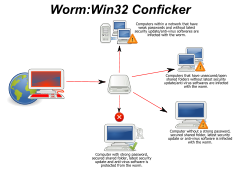
Conficker Virus- This computer virus has infected over 15 million computers to date from its discovery in Early 2008. This virus expliots a vulnerability in the Windows service programs and causes your computer to download a copy of the virus therby infecting your computer. Your computer can also be used as a base to host future virus attacks on other computers once infected.
Symptoms of the Conficker Virus
- Being locked out User accounts
- Windows services disabled (Windows defender, Automatic Updates)
-Decrease in overall system performance
- Anti-virus systems disabled
To check if your computer has the conficker virus please visit:
http://www.confickerworkinggroup.org/infection_test/cfeyechart.html
Symptoms of the Conficker Virus
- Being locked out User accounts
- Windows services disabled (Windows defender, Automatic Updates)
-Decrease in overall system performance
- Anti-virus systems disabled
To check if your computer has the conficker virus please visit:
http://www.confickerworkinggroup.org/infection_test/cfeyechart.html
Labels:
viruses
Common Internet Safety Myths
Don't believe what everyone tells you these days, there is a lot of speculation these days to regards with internet safety and most of the rumors that spread around are usually untrue and leave your computer open to malware and viruses.
1) A common myth to regards with internet safety is "Macs don't get viruses" refering to the myth that computers produced by Apple do not get viruses because they run on a different operating system. This is untrue as the Macintosh computers can get viruses just the same as windows computers, but at a lesser rate since viruses and malware are usually designed for the windows operating system.
2) "<Insert browser name here>" is safer than internet explorer". Everybody likes to bash internet explorer these days as it is slow and clunky in comparison to much faster browsers such as Google chrome. The truth of the matter is that each browser have an equal chance of getting infected with viruses and the protection is based upon what anti-virus software you have rather than the type of browser you are using.
Labels:
Tips
3 Things to do after purchasing a new computer
1) Uninstall all of the "bloatware" on your new computer, new computers usually have fast performance so you will usually not notice the decrease in system performance in the short-run, but system performance will suffer in the long run. "Bloatware" on a new computer would be programs that come installed with the computer.
2) Install anti-virus software IMMEDIATELY it is vital that you add protection to your new computer as it is better to be safe than sorry. Just get it out of the way quickly and you won't have to worry about viruses in the future. A recommended anti-virus program would be Avast.
Avast Anti-virus program: www.avast.com
3) Backup your system on a CD. If a virus strikes and you have no way of fixing the problem without bringing your computer to a computer repair shop the usual solution is just to wipe your whole hard-drive and your system will be operational again.
2) Install anti-virus software IMMEDIATELY it is vital that you add protection to your new computer as it is better to be safe than sorry. Just get it out of the way quickly and you won't have to worry about viruses in the future. A recommended anti-virus program would be Avast.
Avast Anti-virus program: www.avast.com
3) Backup your system on a CD. If a virus strikes and you have no way of fixing the problem without bringing your computer to a computer repair shop the usual solution is just to wipe your whole hard-drive and your system will be operational again.
Labels:
Tips
Blog Archive
Labels
- internet scams (11)
- Tips (11)
- viruses (5)
Powered by Blogger.
Links to Useful Websites
About
This blog was created with the intention of providing information about different types of scams and viruses on the internet and also to give tips on how to optimize your computer experience.